In brief
Ownway is a mobile route and stop planner for drives where the destination is known but the right stops are not. A driver describes the trip in one brief, Ownway finds and orders suitable places, and the finished route opens in the navigation app the driver already uses.
The problem starts before navigation
Navigation apps are good at guiding a driver to a known place. A different problem appears when the driver knows the kind of stop they want but not its name or exact location.
That might mean coffee after an hour, lunch near water, a viewpoint before sunset, or a route that avoids busy cities where practical. Each request affects the whole drive. Searching for every stop separately makes it difficult to judge the final order and the total detour.
Ownway was built around this planning step rather than duplicating turn-by-turn navigation.
One brief should describe the whole drive
The starting point for Ownway is a natural trip request. It can contain the origin, destination, several stops, timing, and route preferences together.
Ownway interprets that request, resolves real places, orders them, and prepares route options. The driver can review the stop order and compare the time or distance trade-off before choosing a route.
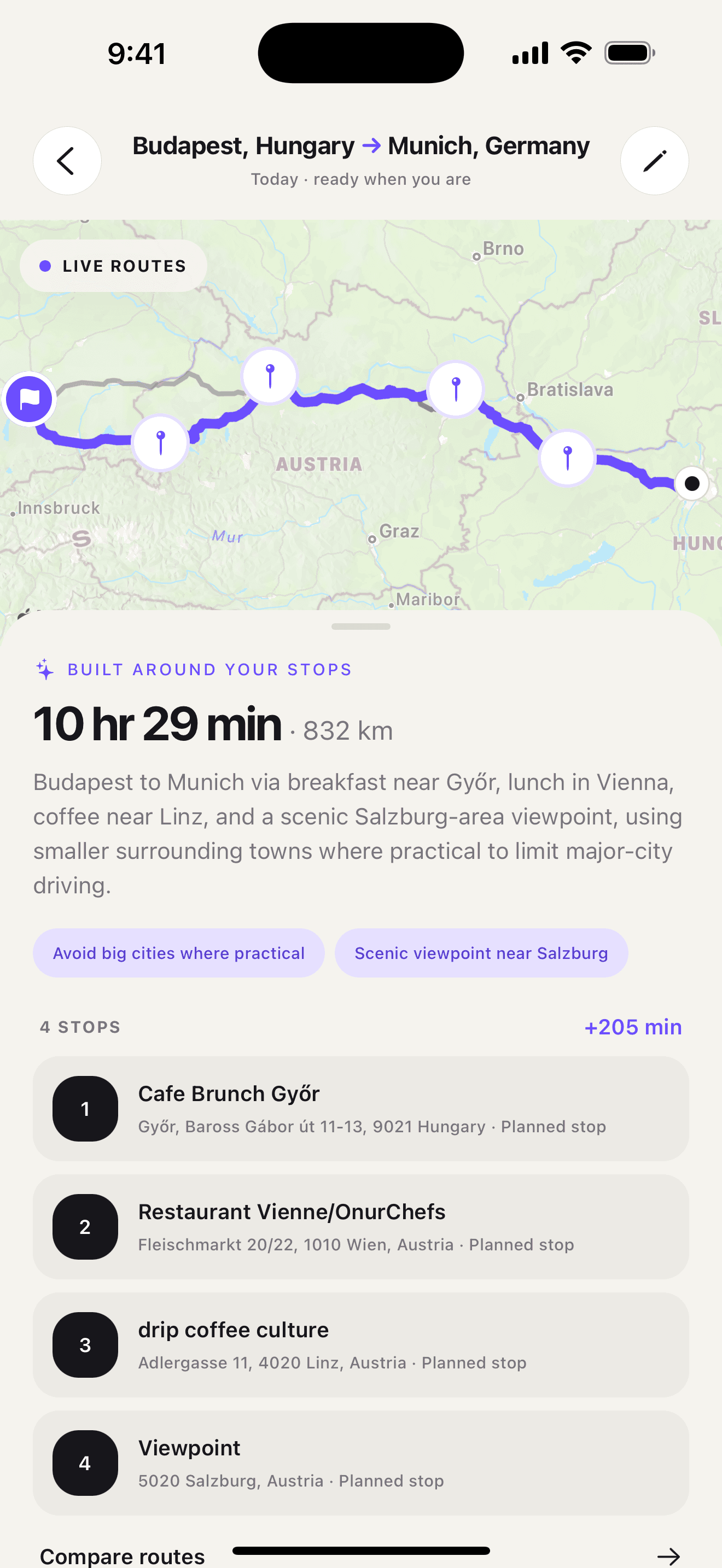
The screenshot below comes from the Ownway app. It shows an ordered coffee stop, the planned route, and the aggregate detour trade-off in the same review step.
Planning and navigation have different jobs
Ownway does not try to replace turn-by-turn navigation. Its job is to build the trip before the driver starts.
Apple Maps supports native multi-stop routes, and Ownway can prepare its ordered route and planned points for Apple Maps or Google Maps within each app's supported limits. Waze works with one intermediate stop per native route, so Waze Companion keeps the itinerary in Ownway and prepares a notification for the next leg as the driver reaches each planned point, including route-shaping points.
This separation keeps the product focused: Ownway handles intent, stop selection, order, and route comparison. The navigation app handles live guidance on the road.
The broader Apple Maps, Google Maps, and Waze comparison explains why that handoff differs by navigation app. For the complete planning method before handoff, read how to plan a road trip with multiple stops.
The route preview should make trade-offs visible
A useful stop is not useful at any cost. A place may be highly rated but add too much time, sit on the wrong side of a city, or pull the route away from the direction of travel.
Ownway therefore shows more than a list of places. The route preview includes the ordered stops, route shape, duration, distance, and the aggregate difference from the fastest direct route. The two alternatives are direct comparison routes without the planned stops, so the driver can judge whether the complete stop plan is worth the added travel before navigation.
What stays on the device
Saved places and trip history stay on the device. Route requests and the starting location are processed by Ownway and the routing providers required to build the trip.
That boundary is stated directly in the app and on the website because route planning should be useful without making data handling difficult to understand.
What comes next
This journal documents the product decisions behind Ownway and publishes practical guides to planning multi-stop drives, comparing route tools, choosing useful stops, and handing a trip to Apple Maps, Google Maps, or Waze.
The road trip planner app comparison also states where broader products are the better fit. Ownway product claims are identified as first-party information, while changing competitor facts are linked to dated primary sources.
The aim is not to add another layer of travel inspiration. It is to make the plan between departure and destination much easier to build.
Sources
- Change or add stops to your route in Maps on iPhoneApple Support · Accessed August 14, 2026
- Get Started with Maps URLsGoogle for Developers · Accessed August 14, 2026
- Add a stop to your routeWaze Help · Accessed August 14, 2026