In brief
The best Google Maps alternative for multiple stops depends on what is missing. Choose Apple Maps for a known iPhone itinerary, Waze for live driving one leg at a time, or Ownway when you know the kind of stops you want but not the exact places. Ownway finds and orders the stops first, then hands the route to a maps app.
Why people outgrow Google Maps for road trips
Google Maps is a strong navigation and map search product. The problem is that a road trip plan is often more than a few addresses.
A real trip brief might be:
Budapest to Prague, with coffee after about 90 minutes, lunch somewhere walkable, one scenic stop if it adds less than 25 minutes, and arrival before dinner.
Google Maps can help once the places are chosen. It can show directions, reorder known stops manually, and search along a route. But it does not take that whole brief and turn it into a balanced itinerary. You still have to choose the coffee stop, decide whether the scenic stop is worth the detour, and verify that the route still works as a day.
What Google Maps handles well
Google’s current iPhone help page says Google Maps can add multiple destinations for supported transportation modes, with up to 9 stops including the final destination. It also documents manual stop reordering and along-route search.
That makes Google Maps a good fit when:
- the stop list is short enough;
- the places are already known;
- you want familiar map search and route preview;
- you can manually reorder the stops before leaving;
- you are comfortable with Google Maps as the navigation app.
For the exact steps and current stop behavior, read the Google Maps multiple stops guide.
Where a dedicated route planner helps
A dedicated planner is useful before Google Maps opens. It should answer questions like:
| Planning job | Why it matters | What to use |
|---|---|---|
| Find unknown stops | The request is a type of place, not an address | A road trip planner or route-aware discovery workflow |
| Control detours | A good place can be wrong if it adds too much time | Compare the complete route against a direct baseline |
| Balance timing | Lunch, coffee, and viewpoints need sensible positions | Plan the whole day before navigation |
| Prepare navigation handoff | Different apps accept different stop formats | Choose Apple Maps, Google Maps, or Waze after planning |
The core distinction is planning versus navigation. Planning decides where the trip should go. Navigation guides the active drive.
Alternative 1: Apple Maps
Apple Maps is the cleanest Google Maps alternative for many iPhone users who already know the stops. Apple documents support for up to 14 stops along a driving route, and the app lets you change or reorder stops before driving.
Use Apple Maps when:
- you are on iPhone;
- you know the places;
- your route has more stops than you want to manage in Google Maps;
- Apple Maps is acceptable for turn-by-turn navigation.
The limitation is similar to Google Maps: Apple Maps can help you search, but it still expects you to select the places.
Alternative 2: Waze
Waze is not a full Google Maps route planner alternative for multiple stops. It is a live driving alternative. Waze’s current help page says one stop can be added before a final destination.
Use Waze when traffic reports and the driving interface matter more than storing the full itinerary inside the navigation app. For longer trips, keep the complete plan elsewhere and open the next Waze leg as the drive progresses.
If Waze is your target, use the free Waze multiple stops planner or read the Waze route planner alternative guide.
Alternative 3: Ownway
Ownway is for the road trip planning step before navigation. You can describe the drive in plain language instead of starting with a perfect address list. Ownway can resolve fitting places, order the stops, compare route trade-offs, and prepare the trip for a maps app.
That matters when the request is experiential:
- “find a relaxed lunch stop near water”;
- “add a short viewpoint if it does not create a big detour”;
- “coffee after about two hours”;
- “avoid making the route much longer just for one stop.”
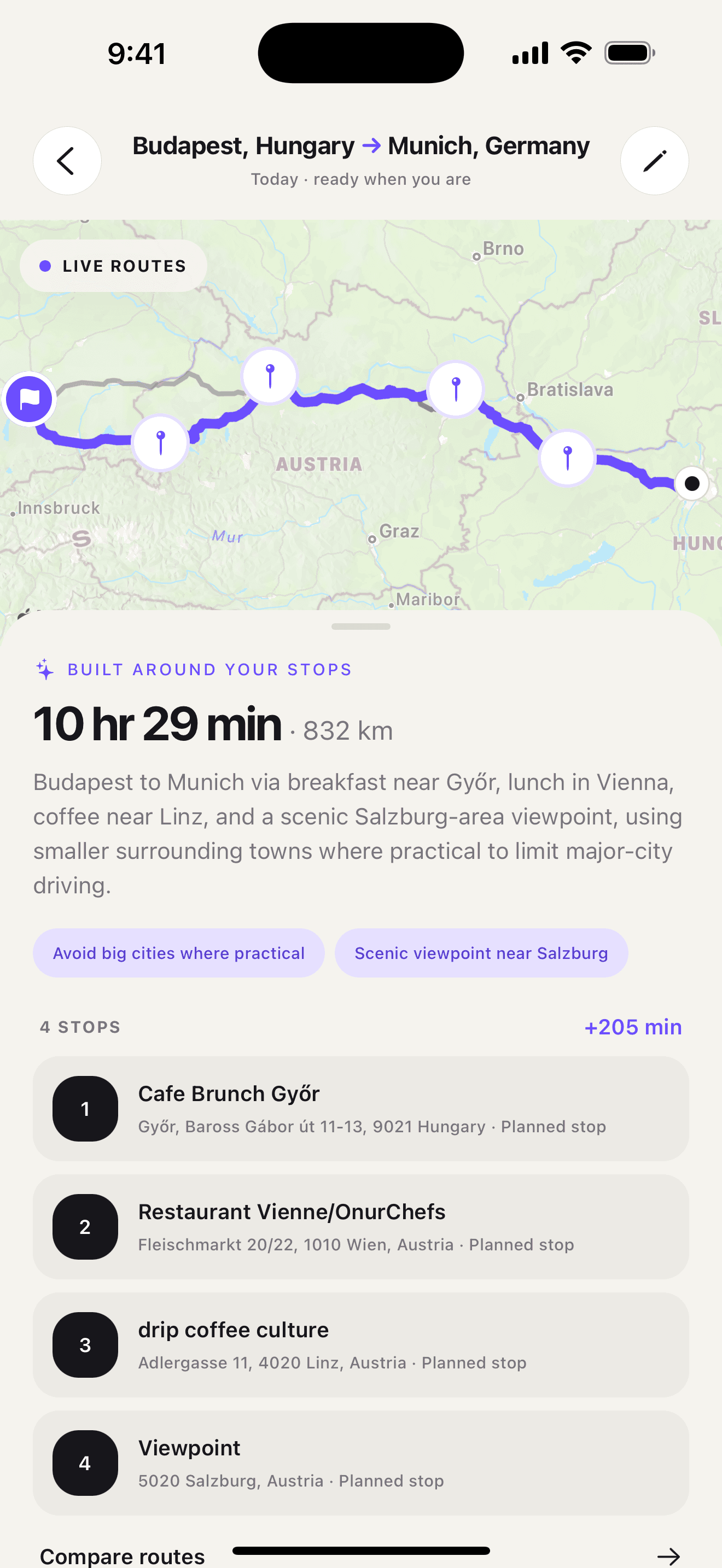
Ownway does not need to replace Google Maps. In many cases, it prepares the plan and then uses Google Maps as the navigation layer where supported. For Waze, Ownway keeps the plan and prepares the next route handoff one leg at a time.
How to choose the right alternative
Use this practical rule:
- If you know every stop and want Google’s interface, use Google Maps.
- If you know every stop and are on iPhone, compare Apple Maps.
- If you want Waze driving, plan elsewhere and open Waze leg by leg.
- If you do not know the best stops yet, use a planner before any navigation app.
That last case is the one Ownway is built for. It starts from the road trip you want, not only the addresses you already have.
For broader app selection, read Best Road Trip Planner Apps: 2026 Guide. For a complete planning workflow, read How to Plan a Road Trip With Multiple Stops.
Frequently asked questions
- What is a good Google Maps alternative for multiple stops?
- If you already know every stop and use iPhone, Apple Maps is a strong native alternative. If you want a planner to choose and order road trip stops from a natural description, use a dedicated planner such as Ownway before handing the route to navigation.
- Why not use Google Maps for every road trip?
- Google Maps is useful for directions and shorter stop lists, but it still expects you to choose the actual places and manually review the order. Longer or experience-led road trips often need planning before navigation.
- Can Ownway replace Google Maps navigation?
- No. Ownway is the planning layer. It helps find and order stops, then prepares the itinerary for Apple Maps, Google Maps, or Waze Companion depending on the route and user choice.
Sources
- Get directions & show routes in Google MapsGoogle Maps Help · Accessed September 1, 2026
- Get Started with Google Maps URLsGoogle for Developers · Accessed September 1, 2026
- Change or add stops to your route in Maps on iPhoneApple Support · Accessed September 1, 2026
- Add a stop to your routeWaze Help · Accessed September 1, 2026
- ownway - Route & Stop PlannerApp Store · Accessed September 1, 2026