In brief
Choose inRoute when you already know most of the locations and want deep control over a long route, including waypoint optimization, weather, elevation, curves, RV restrictions, imports, or built-in navigation. Choose Ownway when you know the drive you want but not the exact places: describe the meal, coffee, viewpoint, timing, and detour preferences, then let Ownway find and order suitable stops before handing the trip to your preferred maps app.
inRoute vs Ownway at a glance
| Dimension | inRoute | Ownway |
|---|---|---|
| Best fit | Long, waypoint-heavy or technically detailed routes | Leisure drives where the right stops still need to be found |
| Starting point | Known places, pins, contacts, or imported files | A natural-language description of the drive and desired stops |
| Stop discovery | Search along the route by category and interval | Resolve experience-led requests into fitting places |
| Waypoint capacity | Up to 150 locations with Pro; eight in the free version | Focused trips with a smaller set of meaningful stops |
| Route controls | Weather, elevation, curviness, alternates, timing, and RV settings | Preferences and detour limits described in the trip brief |
| Navigation | Built-in voice guidance and CarPlay, plus external handoff | Apple Maps, Google Maps, or Waze Companion |
| Imports and exports | XLSX, GPX, KML, and GPX-compatible workflows | Consumer navigation-app handoff rather than file export |
| Learning curve | More controls and planning depth | Smaller, guided mobile workflow |
Choose inRoute when route control is the main job
inRoute is a mature route planner and navigation app for people who want to control the mechanics of a drive. Its current App Store listing documents waypoint optimization, manual reordering, route alternatives, departure and layover times, and routes shaped around weather, elevation, or curviness.
Its feature set is especially useful for:
- long trips with many known stops;
- motorcycle drives where road shape and elevation matter;
- RV routing that needs vehicle restrictions considered;
- routes imported from spreadsheets, GPX, or KML files;
- travelers who want weather data along the route;
- drivers who want the planner itself to provide voice navigation and CarPlay support.
The scale difference is significant. inRoute says its Pro plan supports up to 150 locations, while the free version supports eight. Ownway is not designed to replace that large-route, file-based, or RV-specific workflow.
If you already have a precise list of places and want to engineer how the drive passes through them, inRoute is the stronger choice.
Choose Ownway when you know what you want, not where it is
Ownway starts from a different problem. You may know the origin and destination but not the name of the best lunch stop, coffee shop, viewpoint, hotel, or attraction along the way.
Instead of locating every place first, you can describe the trip in one brief:
Drive from Boston to Portland, stop for highly rated coffee after about an hour, find lunch near the water, and add one scenic viewpoint without a large detour.
Ownway turns that intent into real planned stops, orders them, and shows the complete route against direct alternatives. You can then continue in Apple Maps, Google Maps, or Waze Companion.
That makes Ownway the simpler fit when the hard part is deciding where to stop, not configuring a route through places you already selected.
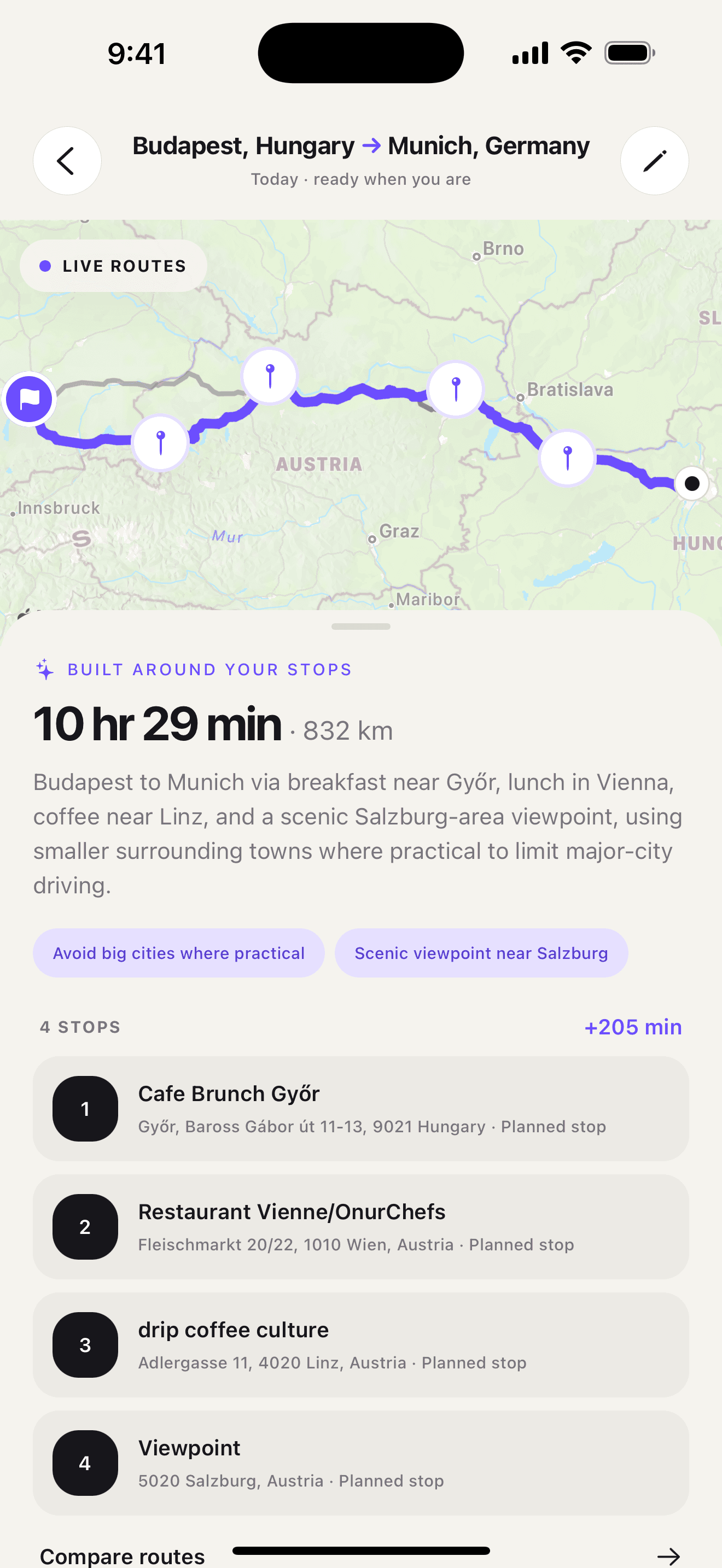
If this is how you plan drives, get Ownway on the App Store.
Both can search along a route, but the input is different
inRoute can search for categories such as fuel, hotels, campgrounds, or food across the whole route, every set distance or time interval, or within the next portion of the drive. This is powerful when you want direct control over when and where to add a category of stop.
Ownway is more conversational and constraint-led. A request can combine the type of place, desired timing, quality preference, and acceptable detour in one description. It then attempts to resolve those requirements together rather than asking you to run separate searches and place each pin manually.
The practical difference is:
- inRoute: “Show me food every two hours along this route so I can choose a stop.”
- Ownway: “Find a well-rated local lunch roughly halfway, close to the route.”
Drivers who enjoy inspecting and tuning a route will likely prefer inRoute. Drivers who want the planner to translate a short brief into a usable stop plan may prefer Ownway.
inRoute has much deeper route intelligence
Weather, elevation, road curviness, sunrise and sunset information, and RV restrictions are not minor extras. They can determine whether a route is suitable at all. inRoute presents these as first-class planning dimensions and can adjust the route around them.
Ownway does not claim the same depth. It shows the ordered stops, route shape, total distance and duration, and the aggregate trade-off against direct alternatives. That is enough to answer “are these stops worth the added travel?” but it is not a weather workstation, RV router, or motorcycle route shaper.
Choose inRoute when road and vehicle constraints define the journey. Choose Ownway when the desired experiences define the stops.
Navigation works differently
inRoute can provide its own voice-guided navigation. Its official CarPlay page also documents route optimization, alternate routes, waypoint routing, vias, and bookmarks in CarPlay.
It can also hand routes to Apple Maps, Google Maps, and Waze. The inRoute support guide describes an Agenda Nav workflow that sends the first leg to an external navigation app and presents the next location after each stop.
Ownway deliberately remains a planning layer:
- Apple Maps and Google Maps receive the planned points within their supported route formats;
- Waze Companion keeps the full trip in Ownway and advances navigation one leg at a time;
- the saved Ownway trip remains the source of truth for the stop sequence.
If you want one app to plan and navigate, inRoute has the advantage. If you already trust a maps app for live directions and want help finding the stops first, Ownway keeps those responsibilities separate.
A practical example
Imagine a weekend drive with five known addresses, a preferred winding road, a weather-sensitive mountain section, and a GPX route you want to preserve. inRoute is built for that level of route control.
Now imagine that the only fixed points are home and a coastal hotel. You want excellent coffee after the morning rush, lunch with a view, and a short scenic break, but you have never driven through the area. Ownway is built for that uncertainty.
The number of stops alone does not decide the winner. The important question is whether the planner should manage known places or help discover the right places.
Which route planner should you choose?
- Choose inRoute for many waypoints, weather-aware routing, elevation and curviness, RV constraints, GPX/KML workflows, or built-in navigation.
- Choose Ownway for a focused leisure drive where you want to describe meals, coffee, viewpoints, timing, and detour preferences without researching every place first.
- Use both when inRoute holds a technically detailed master route but one day still needs experience-led stop discovery before you add the final places.
For a wider comparison, see the best road trip planner apps by planning job. If your final navigation app is Waze, read the Waze route planner alternatives guide. To plan from the route itself, follow the guide to finding stops without large detours.
Sources
- inRoute - Intelligent RoutingApple App Store · Accessed September 27, 2026
- inRoute SupportinRoute · Accessed September 27, 2026
- inRoute for CarPlayinRoute · Accessed September 27, 2026