In brief
Choose MapQuest when you already know the destinations and want a map and navigation app with traffic, route choices, CarPlay, and a multi-stop route of up to 26 stops. Choose Ownway when you know the kind of stops you want but not their names: describe the meal, coffee, viewpoint, timing, and detour preferences, let Ownway find and order suitable places, then continue in Apple Maps, Google Maps, or Waze.
MapQuest vs Ownway at a glance
| Dimension | MapQuest | Ownway |
|---|---|---|
| Best fit | Directions and navigation through known destinations | Leisure drives where the right stops still need to be found |
| Starting point | Addresses, saved places, contacts, or selected points of interest | A natural-language description of the drive and desired stops |
| Multi-stop routes | Up to 26 stops in the current iPhone app | A focused itinerary of meaningful, experience-led stops |
| Place discovery | Browse nearby categories and select places yourself | Resolve combined stop preferences into suitable places |
| Navigation | Built-in voice guidance, live traffic, rerouting, and CarPlay | Handoff to Apple Maps, Google Maps, or Waze Companion |
| Geography | The listing describes navigation for the United States and Canada | Global planning, subject to available place and routing data |
| Route review | Route choices, traffic, toll and highway preferences | Ordered stops plus time and distance trade-offs against direct routes |
Choose MapQuest when the places are already decided
MapQuest combines planning and live navigation. Its current App Store listing documents voice-guided driving directions, real-time traffic, alternate routes, highway and toll avoidance, CarPlay, saved places, and multipoint routes.
The iPhone version history says a single route can contain up to 26 stops. That makes MapQuest the stronger choice when you have a substantial list of known addresses and want one app to carry the route into turn-by-turn navigation.
MapQuest is especially useful when:
- every destination is already selected;
- traffic and live rerouting matter during the drive;
- you want navigation directly in the planning app;
- you use CarPlay;
- you need a longer known stop list;
- the trip is in the United States or Canada.
Ownway is not trying to replace MapQuest's live navigation, traffic reporting, or 26-stop capacity.
Choose Ownway when the stops are still a question
Ownway begins one step earlier. The origin and destination may be fixed, but you may not know which restaurant, coffee shop, viewpoint, hotel, or attraction belongs in the route.
Instead of searching each category and evaluating pins one by one, describe the drive in one request:
Drive from Nashville to Asheville, find highly rated coffee after about 90 minutes, add lunch with a mountain view, and keep the total detour small.
Ownway resolves that intent into real places, orders the stops, and shows the planned itinerary against direct alternatives. You can then hand navigation to Apple Maps, Google Maps, or Waze Companion.
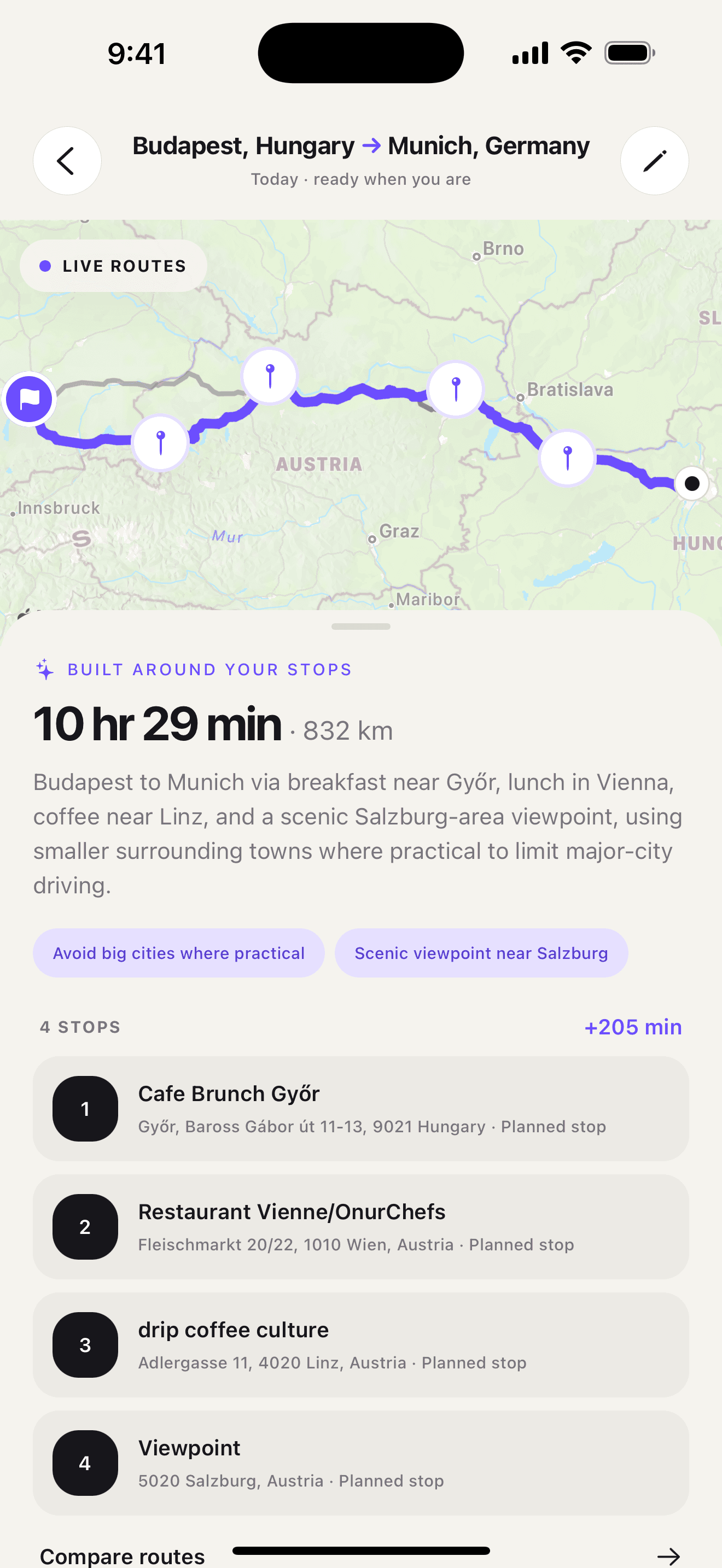
If the difficult part is finding the stops rather than entering them, get Ownway on the App Store.
Both discover places, but the workflow is different
MapQuest lets drivers explore nearby restaurants, hotels, gas stations, and other points of interest. It also shows gas prices and local weather. That is practical map-based discovery: browse a category, inspect options, and add the chosen place.
Ownway accepts several preferences together. A request can combine the type of place, quality, approximate timing, route position, and detour tolerance. It then attempts to choose stops that work as a complete drive.
The difference is easiest to see in the input:
- MapQuest: search for restaurants, inspect the map, choose one, and add its address.
- Ownway: ask for a well-rated local lunch roughly halfway with no large detour.
MapQuest gives you direct control over the selected pins. Ownway reduces the research needed before those pins exist.
MapQuest is the navigation app; Ownway is the planning layer
MapQuest offers its own voice guidance, lane information, speed limits, traffic updates, incident reporting, and CarPlay experience. If you want one app to plan and drive the route, that integration is a clear advantage.
Ownway keeps live navigation separate. It holds the planned stop sequence and sends the route to the maps app you prefer:
- Apple Maps and Google Maps receive the planned points within their supported formats;
- Waze Companion advances a multi-stop trip one leg at a time;
- the saved Ownway trip keeps the full itinerary available.
That separation is useful if you already trust Apple Maps, Google Maps, or Waze for the road but need a better way to decide where to stop.
A practical example
Suppose you are visiting 18 customer addresses in one city. You already have the locations, need traffic-aware directions, and want turn-by-turn navigation in the same app. MapQuest is the closer fit.
Now suppose you are driving to a weekend destination and only know the experience you want along the way: excellent coffee, a scenic lunch, and one short viewpoint stop. Ownway is the closer fit because it starts before the addresses are known.
The choice is not simply about which app supports more stops. It is about whether your route is a list of places or a description of the drive you want.
Which route planner should you choose?
- Choose MapQuest for known destinations, larger multi-stop routes, live traffic, built-in navigation, and CarPlay in the US or Canada.
- Choose Ownway for a focused leisure drive where you want the planner to find and order stops from ordinary-language preferences.
- Use both when Ownway helps identify the places and MapQuest is your preferred navigation app for a supported trip.
For more options, compare the best route planner apps for road trips. If the addresses are already known, read the Google Maps multiple-stops guide. If Waze is your preferred navigator, see the Waze route planner alternatives.
Sources
- MapQuest GPS Navigation & MapsApple App Store · Accessed September 29, 2026