In brief
Choose Routora when you already know the addresses and want them rearranged into an efficient multi-stop route. Choose Ownway when you know the drive but not the places: describe the coffee, meal, viewpoint, hotel, or attraction you want, let Ownway find and order suitable stops, then navigate with Apple Maps, Google Maps, or Waze.
Routora vs Ownway at a glance
| Dimension | Routora | Ownway |
|---|---|---|
| Best fit | Deliveries, field work, sales calls, and errands with known addresses | Road trips and unfamiliar drives where the right places are not yet known |
| What you provide | A list of stops or addresses | Origin, destination, and a description of what you want along the way |
| Main job | Reorder stops into an efficient route | Find suitable places, order them, and show the route trade-off |
| Useful controls | Imports, time windows, priorities, team preferences, and dispatch | Stop purpose, timing, preferences, route position, and detour tolerance |
| Work features | Team dispatch and stop-outcome tracking | Not designed for fleet or delivery operations |
| Navigation handoff | Google Maps, Apple Maps, and Waze | Apple Maps, Google Maps, and Waze Companion |
| Best question | What is the fastest order for these addresses? | Which places best match what I want on this drive? |
Both products sit between a list of intentions and a navigation app, but they begin with different information. Routora expects the stops to exist already. Ownway is useful one step earlier, when several stops are still ideas rather than place names.
Choose Routora when your stop list is complete
Routora describes its product as a route-optimization platform for individuals and field teams. Add stops one by one, paste them, or import a spreadsheet; Routora then sequences the addresses into an efficient route.
Its official product pages highlight capabilities such as:
- optimizing a list of known stops;
- importing addresses from CSV, Excel, or the clipboard;
- accounting for time windows, priorities, and member preferences;
- dispatching routes to field-team members;
- tracking completed, skipped, or follow-up outcomes;
- handing navigation to Google Maps, Apple Maps, or Waze.
That workflow makes sense when every location is mandatory. A delivery driver, salesperson, inspector, or home-service technician usually knows which customers must be visited. The unresolved question is the most efficient order.
Routora also supports personal routing for errands and other address-heavy days. If you have twelve stores, appointments, or collection points and want to reduce backtracking, it solves the relevant problem directly.
Choose Ownway when the places are still unknown
Ownway starts with a different kind of input. You may know the beginning and end of the drive but only be able to describe the stops you want.
For example:
Drive from Munich to Lake Garda. Find excellent coffee after about 90 minutes, a relaxed lunch with outdoor seating close to the route, and one scenic viewpoint that adds no more than 20 minutes.
Ownway resolves those preferences into actual places, orders them, and shows how the planned trip compares with direct route alternatives. The result can then be handed to Apple Maps, Google Maps, or Waze Companion.
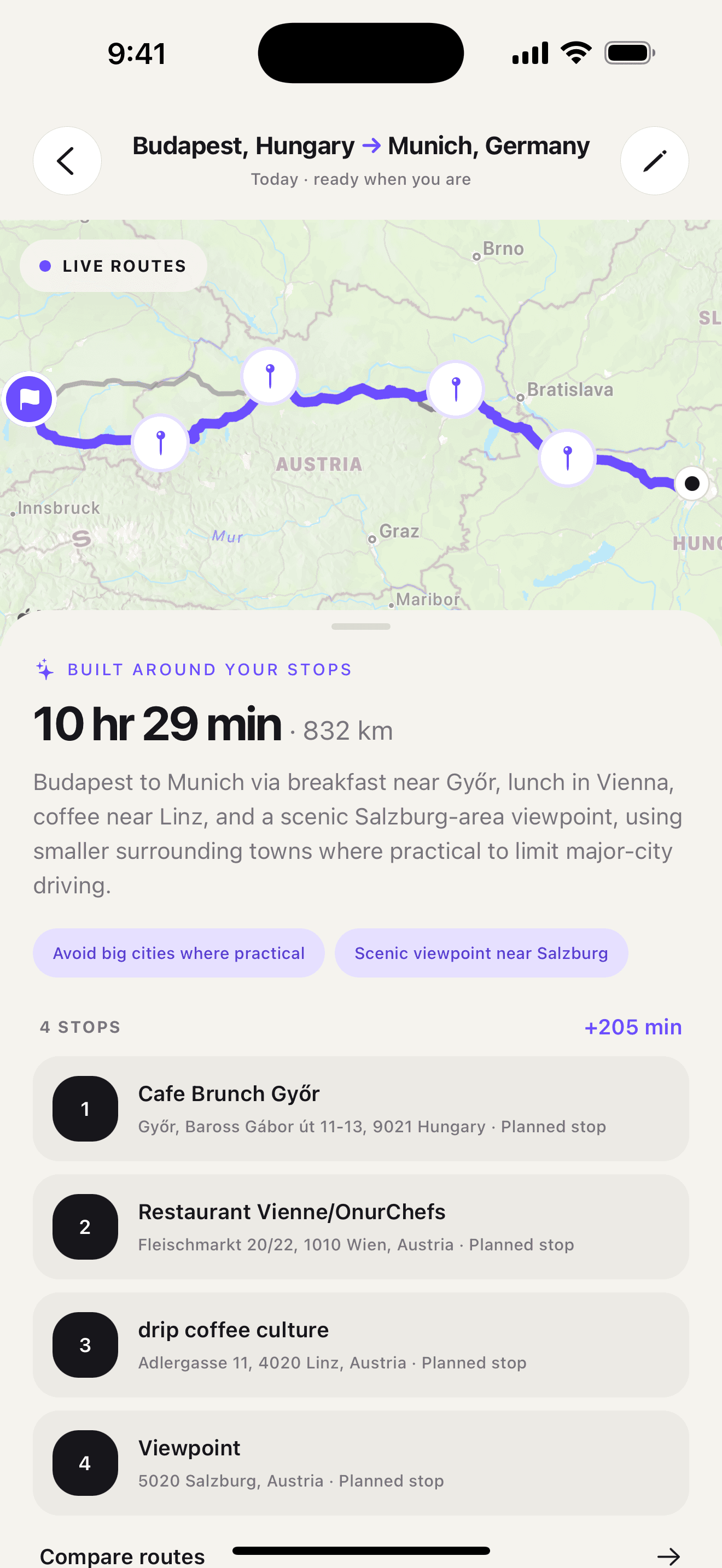
If your planning problem starts with “find somewhere that fits,” download Ownway from the App Store or Google Play.
Known-address optimization and stop discovery are different
Route optimization starts after the research is finished. Every stop has an address, so the planner can compare possible sequences and reduce unnecessary travel.
Stop discovery starts earlier. “Good coffee halfway,” “a viewpoint with a short detour,” and “a family-friendly restaurant near the motorway” are not destinations yet. A planner must identify suitable places before it can produce an itinerary.
Use this quick test:
- If you could paste every stop into a spreadsheet right now, Routora is likely the better fit.
- If several stops are descriptions rather than addresses, Ownway is likely the better fit.
- If you have a long list of required work stops, use a professional optimizer even if one optional leisure stop is involved.
- If you are planning a short leisure drive with known addresses only, a standard maps app may already be enough.
For a broader look at consumer navigation limits, compare Apple Maps, Google Maps, and Waze for road trips.
Practical example: service route versus weekend drive
Two journeys can each contain ten stops while needing completely different planning tools.
A field-service day
A technician begins at a depot, must visit eight customers, has two appointment windows, and returns to the depot. Every address is fixed. The goal is to minimize travel while respecting operational constraints.
Routora is the natural choice. Its optimization, importing, time-window, dispatch, and completion features are built around this kind of known-stop work. Ownway would not replace those operational tools.
Drivers comparing specialist work-route products can also read RoadWarrior vs Ownway, which separates delivery and field-service operations from leisure stop discovery.
A weekend road trip
A couple is driving from Vienna to the Dolomites. They want breakfast after leaving the city, a lakeside walk, and an early dinner near their hotel, but they have not chosen any venues.
Ownway is the better starting point. The travelers can describe the experience, timing, and acceptable detours instead of researching every candidate place before planning the route.
Routora could optimize the addresses after that research was complete, but it would not answer the earlier question: which breakfast spot, lake, and restaurant actually fit this drive?
Navigation apps are the final layer
Neither planner needs to replace the navigation app a driver already trusts.
Routora says its routes can hand off to Google Maps, Apple Maps, and Waze. This fits its work-routing model: Routora owns the ordered itinerary while the maps app handles directions.
Ownway can send supported multi-stop routes to Apple Maps or Google Maps. Waze Companion keeps the complete itinerary in Ownway and advances through it one leg at a time because Waze focuses on the current destination and one intermediate stop.
If Waze is your preferred navigator and your addresses are already known, the free Waze multiple-stops planner provides a lightweight leg-by-leg workflow. For a deeper comparison of known-address optimization, read Spoke Route Planner vs Ownway.
Which route planner should you choose?
- Choose Routora when you have a complete address list and want efficient ordering, imports, work constraints, dispatch, or field outcomes.
- Choose Ownway when you know what would improve the trip but need help finding the actual places along the route.
- Choose Apple Maps or Google Maps directly when the trip is simple, the stops are known, and automatic optimization is not important.
- Keep specialist work in specialist software. Ownway is not a fleet-management, proof-of-delivery, or workforce-dispatch system.
The simplest distinction is also the most useful: Routora optimizes where you already need to go. Ownway helps decide where you should stop.
For more options organized by planning job, see the best road-trip planner apps.
Sources
- Routora route optimizationRoutora · Accessed October 20, 2026
- Routora on WebRoutora · Accessed October 20, 2026
- RoutoraApple App Store · Accessed October 20, 2026