In brief
Choose MyRoute-app when you want detailed control over known waypoints, route shape, route files, scenic riding, and navigation inside one route ecosystem. Choose Ownway when you know the destination but not the places: describe the meal, coffee, viewpoint, hotel, or attraction you want, let Ownway find and order suitable stops, then navigate with Apple Maps, Google Maps, or Waze.
MyRoute-app vs Ownway at a glance
| Dimension | MyRoute-app | Ownway |
|---|---|---|
| Best fit | Drivers and riders who want detailed route creation, waypoint control, route libraries, and route-file workflows | Leisure drives where the destination is known but the right stops are not |
| What you provide | Addresses, map positions, imported routes, tracks, or selected library routes | Origin, destination, and a description of what you want along the way |
| Main job | Create, edit, store, share, export, and navigate controlled routes | Find suitable places, order them, and show the route trade-off |
| Route controls | Waypoints, route options, map choices, shaping, reversing, splitting, and route or track workflows | Stop purpose, timing, preferences, route position, and detour tolerance |
| Discovery | RouteXpert routes, nearby routes, POIs, scenic routes, and accommodation tools | Places matched to a natural-language trip brief |
| Navigation | Optional MyRoute-app turn-by-turn navigation with offline support, CarPlay, and Android Auto | Handoff to Apple Maps, Google Maps, or Waze Companion |
| Best question | How do I shape and follow this exact route? | Which places best match what I want on this drive? |
These products overlap around routes and stops, but they begin at different stages. MyRoute-app offers a broad toolkit for constructing and following a route. Ownway focuses on resolving vague stop intentions into real places before navigation begins.
Choose MyRoute-app for detailed route craftsmanship
MyRoute-app's official feature list and manuals describe a deep route ecosystem. Drivers can create routes, place and move waypoints, work with different map layers, import or export route files, browse RouteXpert routes, and manage routes and tracklogs.
Its strengths are especially clear when the exact road matters as much as the destination. A motorcyclist planning a winding mountain ride may want to shape the route point by point, compare map calculations, preserve the route as a file, and share it with a group. MyRoute-app is built for that hands-on workflow.
The current documentation also covers:
- route and track navigation;
- synchronized routes and offline navigation;
- scenic A-to-B routes and round trips;
- route libraries, groups, events, and sharing;
- CarPlay and Android Auto support;
- waypoint skipping, road avoidance, POIs, and route adjustments during navigation.
MyRoute-app therefore fits drivers who already have a route concept, known places, or a route file and want strong control over how the journey is shaped and followed.
Choose Ownway when the stops are still descriptions
Ownway starts before every waypoint has a name. You can describe the experience, timing, and acceptable detour in one brief.
For example:
Drive from Budapest to Lake Bled. Find excellent coffee after about 90 minutes, a relaxed lunch with outdoor seating near the route, and one viewpoint that adds no more than 20 minutes.
Ownway finds real places that fit the request, orders them, and shows the planned route alongside direct alternatives. The final itinerary can then be opened in Apple Maps or Google Maps, or used one leg at a time with Waze Companion.
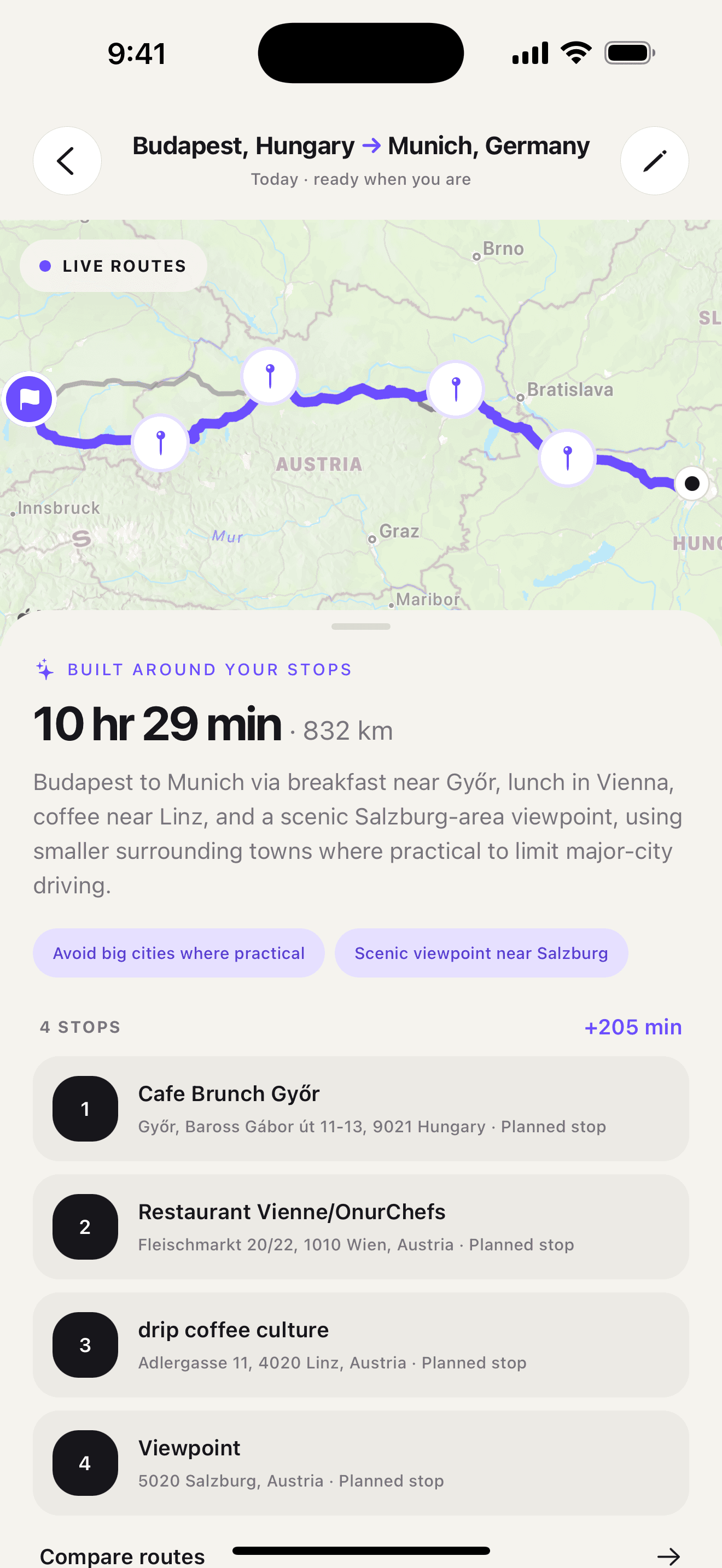
This is a narrower job than MyRoute-app's route-building toolkit. Ownway is not a GPX editor, motorcycle route library, social route network, or built-in turn-by-turn navigator. Its job is to answer the earlier question: where should you stop if you know what you want but not the place name?
If that is your planning problem, download Ownway from the App Store or Google Play.
Route shaping and stop discovery are not the same task
A waypoint editor helps once a place is known. You can add the point, move it, change its order, and make the route follow the roads you prefer.
Stop discovery comes first when the input is “good coffee halfway” or “a scenic lunch without a large detour.” Those phrases do not identify a waypoint. The planner must find suitable candidates, judge them in the context of the route, and only then build an ordered itinerary.
Use this test:
- If you want to control the roads, waypoint positions, route files, or navigation behavior, MyRoute-app is likely the better fit.
- If you want to describe the kind of stops you need and have the places found for you, Ownway is likely the better fit.
- If you already know every address and only need a simple itinerary, Apple Maps or Google Maps may be enough.
- If you need both jobs, discover the places first, then add the final waypoints to the detailed route system you prefer.
For a deeper method, read how to find stops along a route without large detours.
Practical example: a motorcycle tour and a family drive
A weekend motorcycle loop
A rider wants a winding 250-kilometer loop, specific mountain roads, a saved track, offline navigation, and a route that can be shared with friends. The route itself is the experience, and its geometry needs deliberate control.
MyRoute-app is the stronger fit. Its scenic routing, waypoint editing, route and track support, map choices, sharing, and optional navigation are directly relevant. Ownway would not replace that route-authoring workflow.
A family drive to a known destination
A family is driving six hours to a holiday rental. They want a clean break around the halfway point, lunch with a playground soon afterward, and a viewpoint only if the detour stays short. They do not know the towns or venue names.
Ownway is the better starting point because the stops are requirements, not coordinates. It can resolve the brief into real places and order them before the family chooses Apple Maps, Google Maps, or Waze for navigation.
The distinction is not “advanced versus simple.” It is route craftsmanship versus experience-led stop discovery.
Which planner should you choose?
- Choose MyRoute-app for detailed route editing, scenic or motorcycle routes, route files, offline navigation, and a broader route community.
- Choose Ownway when you know what would improve the drive but need help finding and ordering the actual places.
- Use both when Ownway finds the stops and MyRoute-app becomes the master route for a technically controlled tour.
- Use a standard maps app directly when the journey is straightforward and every stop is already known.
MyRoute-app helps you shape and follow the route you have chosen. Ownway helps identify the stops you have not chosen yet.
For more planning styles, compare the best road-trip planner apps by use case, see inRoute vs Ownway for technical route planning, or browse the Ownway road-trip blog.
Sources
- MyRoute-app feature comparisonMyRoute-app · Accessed October 26, 2026
- App - RouteplannerMyRoute-app Support · Accessed October 26, 2026
- App - Routes & TracklogsMyRoute-app Support · Accessed October 26, 2026
- App - NavigationMyRoute-app Support · Accessed October 26, 2026
- ownway: Multi-Stop PlannerApple App Store · Accessed October 26, 2026